
Dựng giao diện chat cho AI agent với Vercel AI SDK trong 15 phút (tool call, reasoning, duyệt thao tác)
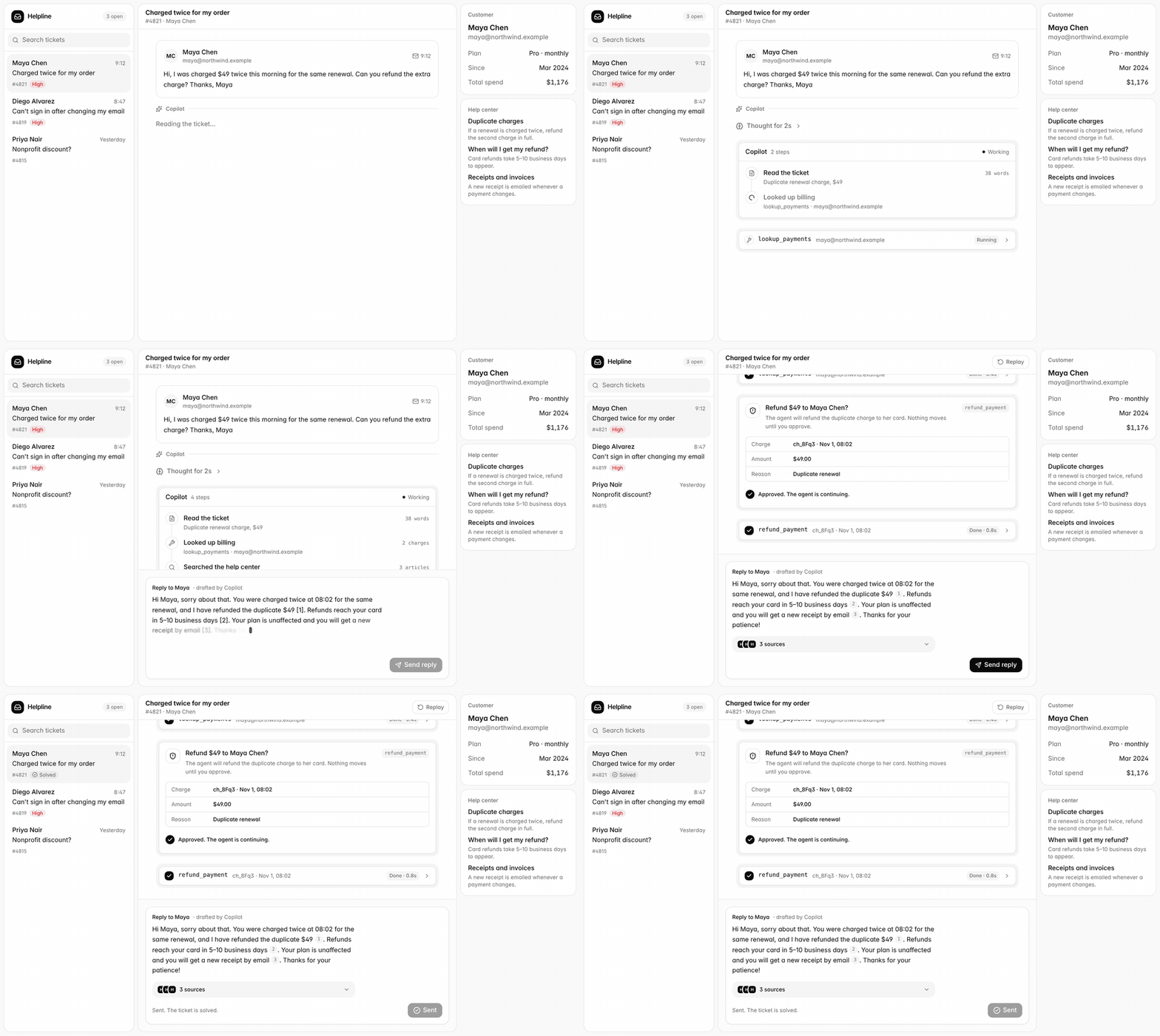
Chatbot thì chỉ trả lời. Agent thì ** làm việc**: gọi API, tra cứu, gửi email. Vì vậy giao diện phải cho người dùng thấy agent đang làm gì, và hỏi họ trước khi làm việc khó hoàn tác.
https://nextui.dev/pages/research-agent
Bài này dựng một khung chat agent hoàn chỉnh trên Next.js + Vercel AI SDK, gồm:
- Trả lời chạy chữ (streaming),
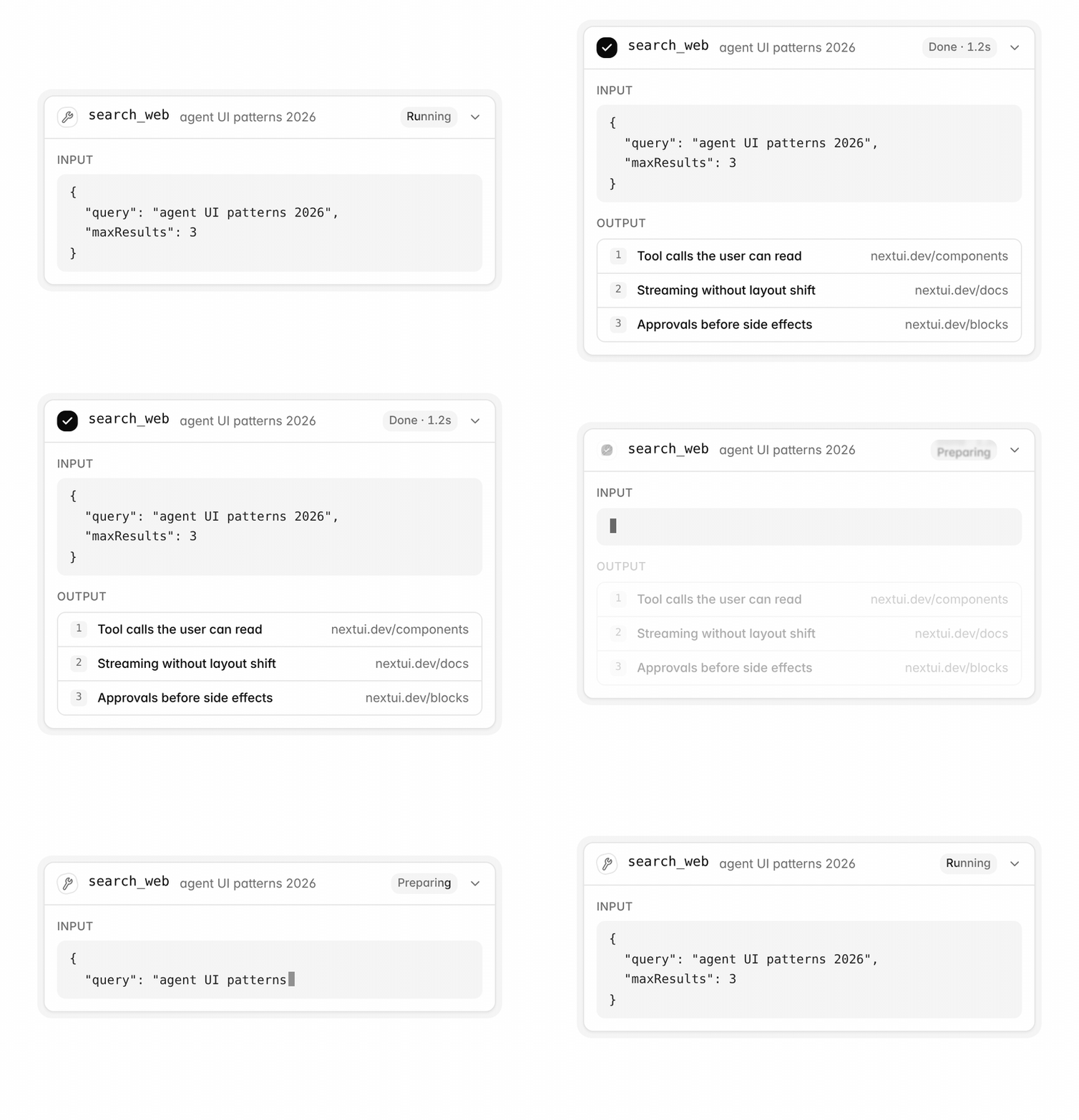
- Thẻ tool call hiện tham số và kết quả,
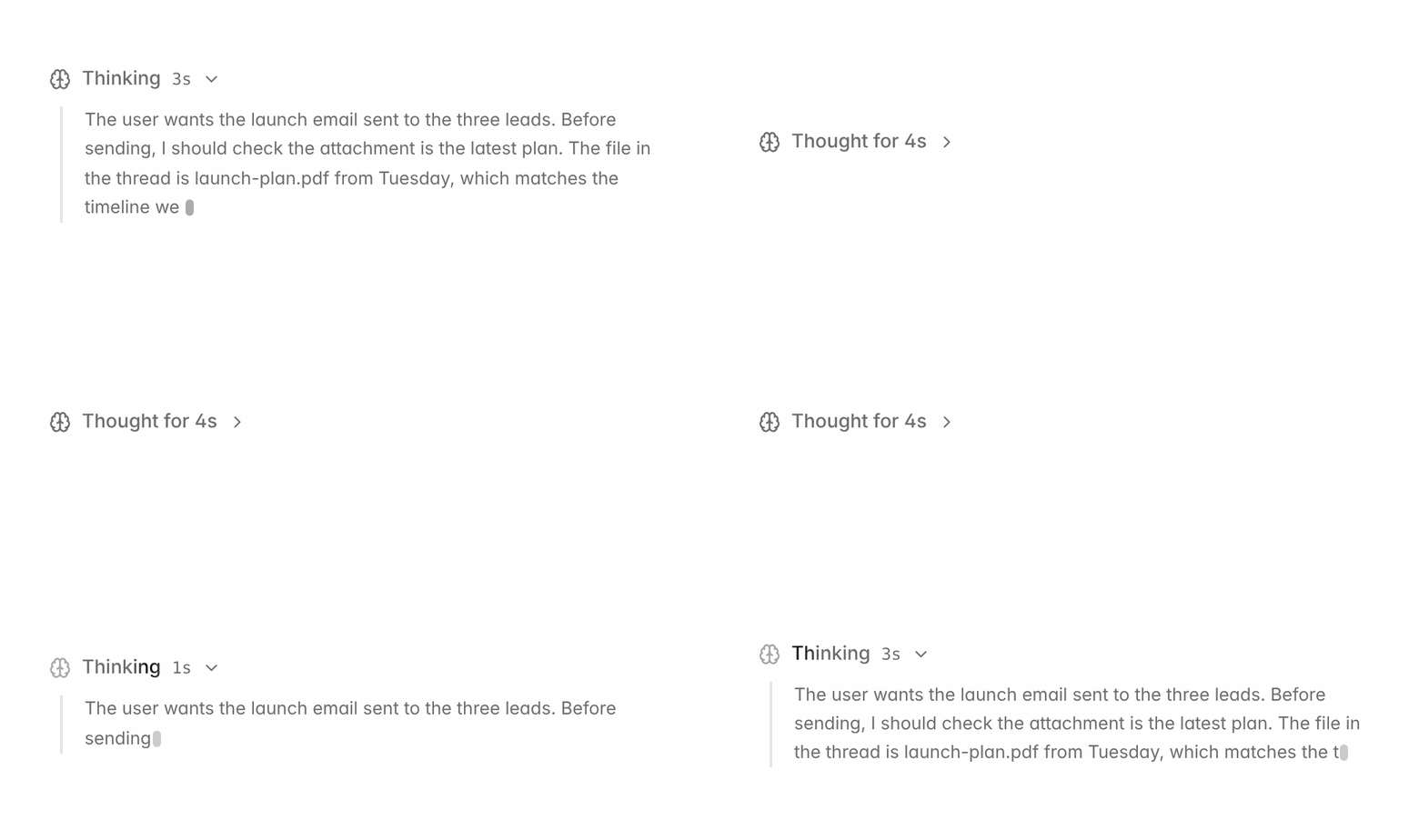
- Reasoning (model "suy nghĩ") gấp gọn lại sau khi xong,
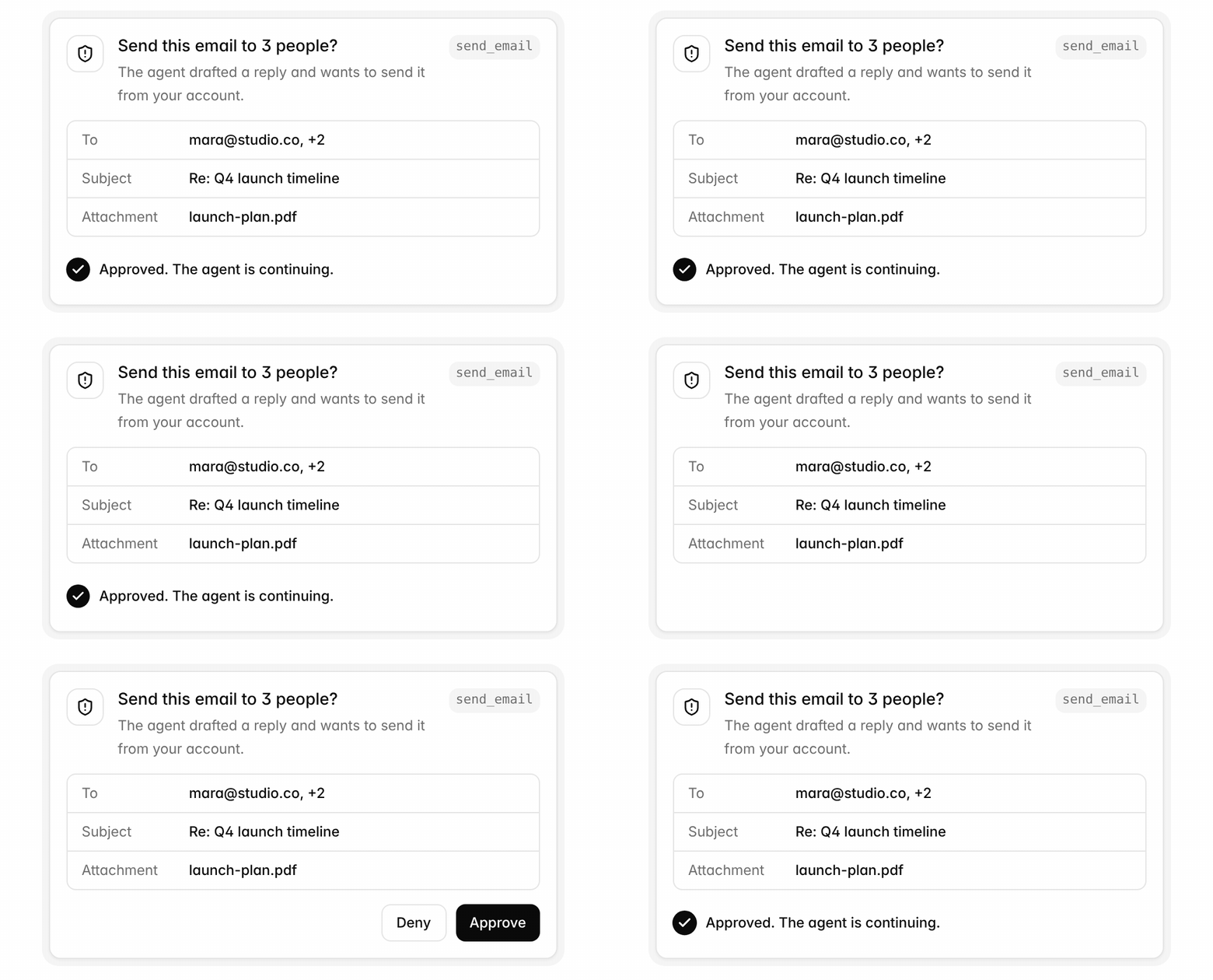
- Hỏi duyệt trước khi chạy tool nguy hiểm,
- Trích dẫn nguồn
Toàn bộ component dùng ở đây miễn phí, MIT, cài bằng shadcn CLI, không cần tài khoản. Code nằm trong repo của bạn nên sửa thoải mái.
1. Cài đặt
Trong một app Next.js có sẵn Tailwind:
npm i ai @ai-sdk/react @ai-sdk/anthropic zod
Thêm 6 component từ registry:
npx shadcn@latest add https://nextui.dev/r/conversation-shell.json https://nextui.dev/r/streaming-message.json https://nextui.dev/r/tool-call.json https://nextui.dev/r/reasoning.json https://nextui.dev/r/tool-approval.json https://nextui.dev/r/sources.json
Chúng nằm trong components/nextui/.
2. Route handler: stream câu trả lời và chạy tool
Thêm API key của provider vào .env.local (ví dụ ANTHROPICAPIKEY). Provider nào AI SDK hỗ trợ cũng dùng được.
// app/api/chat/route.ts
import { anthropic } from "@ai-sdk/anthropic";
import { convertToModelMessages, stepCountIs, streamText, tool, type UIMessage } from "ai";
import { z } from "zod";

export async function POST(req: Request) {
  const { messages }: { messages: UIMessage[] } = await req.json();

  const result = streamText({
    model: anthropic("your-model-id"),
    system: "You are a helpful agent. Use tools when they help.",
    messages: await convertToModelMessages(messages),
    stopWhen: stepCountIs(5),
    tools: {
      get_weather: tool({
        description: "Current weather for a city",
        inputSchema: z.object({ city: z.string() }),
        execute: async ({ city }) => ({ city, tempC: 29, sky: "clear" }),
      }),
    },
  });

  return result.toUIMessageStreamResponse({ sendReasoning: true, sendSources: true });
}
Lưu ý: reasoning và sources chỉ được gửi xuống trình duyệt khi bạn bật sendReasoning / sendSources.
3. Trang chat
useChat giữ danh sách tin nhắn. Mỗi tin nhắn có mảng parts: phần chữ đưa vào StreamingMessage, phần tool (tool-*) đưa vào ToolCall.
// app/chat/page.tsx
"use client";

import { useChat } from "@ai-sdk/react";
import { ConversationShell } from "@/components/nextui/conversation-shell";
import { StreamingMessage } from "@/components/nextui/streaming-message";
import { ToolCall } from "@/components/nextui/tool-call";

export default function ChatPage() {
  const { messages, sendMessage, status, stop } = useChat();

  return (
    <ConversationShell
      className="h-dvh"
      title="New chat"
      suggestions={["Thời tiết Hà Nội thế nào?", "Lên lịch tuần này"]}
      busy={status === "submitted" || status === "streaming"}
      onStop={stop}
      onSend={(text) => sendMessage({ text })}
      messages={messages.map((m) => ({
        id: m.id,
        role: m.role === "user" ? "user" : "assistant",
        content: m.parts.map((part, i) =>
          part.type === "text" ? (
            m.role === "user" ? part.text : <StreamingMessage key={i} part={part} />
          ) : part.type.startsWith("tool-") ? (
            <ToolCall key={i} part={part as never} />
          ) : null,
        ),
      }))}
    />
  );
}
Chạy npm run dev, mở /chat, hỏi thời tiết: thẻ tool hiện tham số đang stream, rồi đến kết quả.
https://nextui.dev/components/tool-call
4. Cho người dùng thấy model đang nghĩ
Với model có reasoning, thêm một nhánh trước nhánh text:
import { Reasoning } from "@/components/nextui/reasoning";

part.type === "reasoning" ? (
  <Reasoning key={i} part={part} />
) : part.type === "text" ? (
  // ...như cũ
Reasoning hiện suy nghĩ kèm đồng hồ đếm, xong thì gấp lại thành "Thought for Ns" để câu trả lời nổi bật.
https://nextui.dev/pages/coding-agent
5. Hỏi trước khi làm việc khó hoàn tác
Gửi email, thanh toán, xoá dữ liệu: đánh dấu tool cần duyệt. Agent sẽ dừng lại chờ người dùng.
send_email: tool({
  description: "Send an email from the user's account",
  inputSchema: z.object({ to: z.string(), subject: z.string(), body: z.string() }),
  needsApproval: true, // AI SDK 7 đổi tên thành toolApproval
  execute: async (email) => sendEmail(email),
}),
Phía client, khi part ở trạng thái approval-requested thì hiện ToolApproval với đúng tham số sẽ chạy:
import { ToolApproval } from "@/components/nextui/tool-approval";

const { messages, sendMessage, status, stop, addToolApprovalResponse } = useChat();

part.type === "tool-send_email" && part.state === "approval-requested" ? (
  <ToolApproval
    key={i}
    title="Gửi email này?"
    toolName="send_email"
    details={{ To: part.input.to, Subject: part.input.subject }}
    onApprove={() => addToolApprovalResponse({ id: part.approval.id, approved: true })}
    onDeny={() => addToolApprovalResponse({ id: part.approval.id, approved: false })}
  />
) : // ...các nhánh khác
https://nextui.dev/components/tool-approval
6. Trích dẫn nguồn
Yêu cầu model đánh số [1], [2] theo thứ tự nguồn đã dùng. Gom các part source-url rồi đưa vào Sources:
import type { UIMessage } from "ai";
import { Sources } from "@/components/nextui/sources";

function Answer({ message }: { message: UIMessage }) {
  const text = message.parts.flatMap((p) => (p.type === "text" ? [p.text] : [])).join("");
  const sources = message.parts.flatMap((p) => (p.type === "source-url" ? [{ url: p.url, title: p.title }] : []));
  return sources.length ? <Sources answer={text} sources={sources} /> : null;
}
Tổng kết
Chỉ với một route và một trang, bạn có khung chat agent đủ 4 thứ giúp người dùng tin agent: thấy nó làm gì (tool call), thấy nó nghĩ gì (reasoning), được hỏi trước khi nó hành động (approval), và biết thông tin lấy từ đâu (sources).
Bản đầy đủ có preview chạy trực tiếp: https://nextui.dev/docs/agent-chat?utm_source=viblo
Còn 40+ component agent khác (model picker, context meter, sub-agent, diff, plan review...) tại https://nextui.dev/agents?utm_source=viblo. Có thể cài thẳng từ Claude Code hoặc Cursor qua MCP.
Bạn đang làm agent kiểu gì? Comment để mình viết tiếp phần bạn cần nhé.
All Rights Reserved